Dev blog · Best of · 2026-11-20 · updated 2026-11-25
The best AI coding agents for 2027
There is no single best AI coding agent. There’s the best one for how you work: in a terminal or an editor, alone or on a team, on a paid plan you already have or on nothing at all.
These are our picks going into 2027. It’s an opinion piece, so here’s where the opinion comes from. We build Calyban, which installs MCP servers and skills into six of these agents, so we spend our days reading their config files and docs. We don’t make any of the agents, and nobody paid to be on this list.
We also don’t quote benchmark scores. The roundups we read this month disagree with each other by several points on the same test, and the leaderboards change every few weeks. What lasts is what each agent is built to do.
The short version:
| If you want | Pick |
|---|---|
| The deepest agent for big, messy codebases | Claude Code |
| An agent that comes with a ChatGPT plan | Codex |
| AI inside a full code editor | Cursor |
| A team already living in GitHub | GitHub Copilot |
| Free and open source, from a big lab | Gemini CLI |
| Free and open source, any model | OpenCode, Aider or Cline |
What matters more than the agent
Every agent on this list starts out able to read and write files, and that’s about it. What makes one great is what you plug in: MCP servers that let it open a browser, read your GitHub issues or query your database, and skills that teach it how your team works.
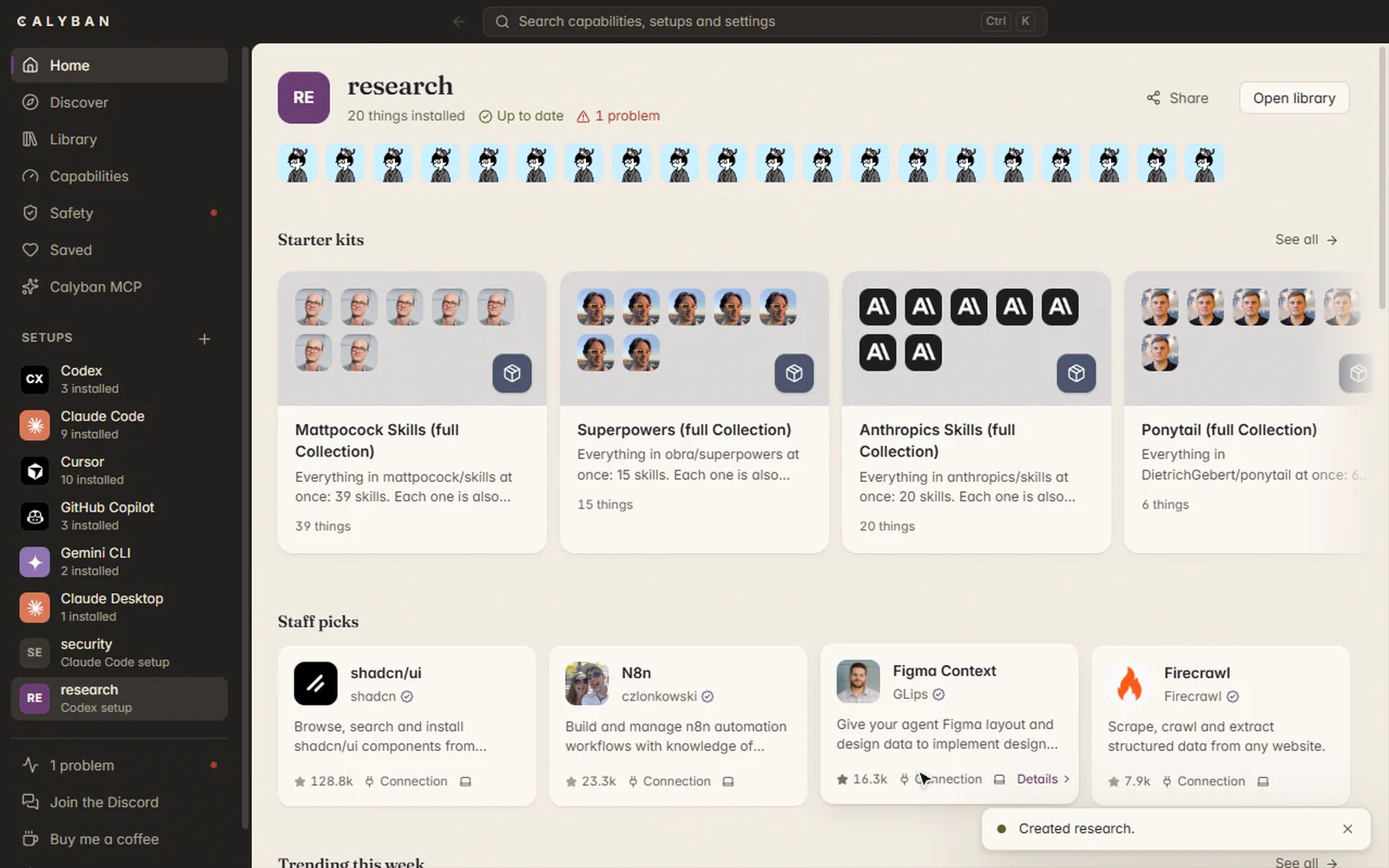
That’s what we build. Calyban is a free app that adds those to six of the agents here (Claude Code, Codex, Cursor, GitHub Copilot, Gemini CLI and Claude Desktop) from a catalog of 7,967 MCP servers, skills, plugins and subagents. Install to each supported agent from the catalog. Safety checks cover skill files before copying and plugin contents after the agent downloads them. Use two agents? Install into each from the same screen, or (from Calyban 1.3) mirror one setup onto the other.
For a day-one setup, its Engineering kit adds GitHub, Context7, Playwright and Sequential Thinking, plus skills for test-driven development, debugging and code review.
Now, the agents.
Claude Code: best for serious work in big codebases
Anthropic’s agent. It runs in your terminal, as a desktop app, inside VS Code and JetBrains, and on the web. It reads a lot of your repo before it acts, plans in steps, and is happy to run your tests until they pass.
Where it pulls ahead is customisation. Claude Code has the widest set of add-ons of any agent here: MCP servers, skills, plugins, subagents, slash commands and hooks. Calyban’s catalog has 825 Claude Code plugins alone. If you like shaping your tools, this is the one with the most to shape.
The honest limit: it needs a paid Claude plan or API credits. There’s no free tier for real use.
Start here: the best Claude Code skills and the best Claude Code plugins.
Codex: best if you already pay for ChatGPT
OpenAI’s agent, in a CLI, a desktop app, an IDE extension and the cloud. Codex is included with ChatGPT’s paid plans, which makes it the easy pick if you’re already paying.
It’s a strong all-rounder with a careful default: it asks before running commands outside its sandbox, and project settings only load in folders you’ve marked as trusted. Its config lives in one TOML file (~/.codex/config.toml), which is pleasant to read and less pleasant to edit by hand at midnight.
Codex takes MCP servers, skills and its own plugins, but not Claude-style subagents. If you want both Codex and Claude Code, they can share skills through ~/.agents/skills on the Codex side. Our skills folder guide has the details.
Cursor: best AI code editor
Cursor is a full editor (a fork of VS Code) with an agent built in. If you want to see every diff, click into files and stay in a GUI, it’s the most polished option.
Two things we like from reading its docs: it loads skills from Claude Code’s and Codex’s folders as well as its own, so skills you already have just work. And its MCP config (~/.cursor/mcp.json) is the simplest of the bunch.
The limit: the agent is only as good as the model you pick, and the best models use up a paid plan’s allowance faster. Watch your usage page in the first month.
GitHub Copilot: best for teams on GitHub
Copilot is now three things that share one setup: chat in VS Code, Copilot CLI in the terminal, and a coding agent you can assign GitHub issues to. It has a free tier, which makes it the cheapest way to try an agent at all.
If your team’s work already lives in GitHub issues and pull requests, nothing fits in as neatly. A project’s .mcp.json is read by both Copilot and Claude Code, so a mixed team can share one server list.
The limit: power users tend to outgrow it. It’s the best starting point here, not the deepest agent.
Gemini CLI: best free agent from a big lab
Google’s open-source terminal agent (Apache 2.0). It takes MCP servers and skills, and it’s the friendliest of the CLIs about config: its settings.json even accepts comments.
One big caveat. Google’s own docs say that on 2026-06-18, Gemini CLI was replaced by Antigravity CLI for unpaid and Google One users. Check which one your account gets before you settle in. Google’s Antigravity editor is the Cursor-style option from the same company.
The open-source options: OpenCode, Aider and Cline
If you want to bring your own model, or run one locally, these are the names that come up most.
- OpenCode is an open-source terminal agent that works with many model providers. It’s the usual answer to “Claude Code, but open source”.
- Aider is the veteran. It’s a terminal pair programmer that commits each change to git as it goes, so undoing a bad idea is
git reset. - Cline is an open-source agent that lives inside VS Code and shows every step for approval.
The trade-off is the same for all three: you pick and pay for the model yourself, and there’s more setup. Some people consider that a feature.
Honourable mention: Devin Desktop
Windsurf was renamed Devin Desktop on 2026-06-02. It’s an editor with an agent, in the same space as Cursor. We’d watch it in 2027, but its own docs currently give three different paths for the same MCP config file, which is why Calyban doesn’t support it yet. (Three paths for one file is two more than we can support.)
Which one should you pick?
- Try Copilot’s free tier if you’ve never used an agent.
- Choose Claude Code if you live in a terminal and want the most control.
- Choose Codex if you already pay for ChatGPT.
- Choose Cursor if you want an editor and see every change.
- Choose OpenCode or Aider if you want open source and your own model.
Most people we talk to end up with two: one terminal agent and one editor. That’s fine. The add-ons are what make any of them good, and those are mostly shared across agents now.
Make whichever you pick better
Picked one? Download Calyban and give it the add-ons from day one. It runs on Windows and Linux, with Mac in testing. The catalog has 7,967 items. For a short list of what to add first, see the 25 best MCP servers.
Disagree with a pick? Tell us why on Discord. We’ll update this list as the agents change, which at the current pace means often. Calyban is free. If it saves you an afternoon, a coffee keeps it going.