Dev blog · Features · 2026-11-22
Copy MCP servers from Claude Code to Cursor, Codex and Gemini CLI
You set up Claude Code with the MCP servers you like. Now you open Cursor and it has none of them. Copying them over sounds like a copy-paste job, but every agent keeps servers in a different file, under a different key, in a slightly different shape.
This post shows the same server in all five formats, so you can do it by hand, then what Mirror in Calyban 1.3 does instead.
Where does each agent keep MCP servers?
| Agent | File (whole user) |
|---|---|
| Claude Code | ~/.claude.json |
| Codex | ~/.codex/config.toml |
| Cursor | ~/.cursor/mcp.json |
| GitHub Copilot (VS Code and CLI) | ~/.copilot/mcp-config.json |
| Gemini CLI | ~/.gemini/settings.json |
Claude Desktop only takes servers that run on your PC through its config file; hosted ones go in its Settings.
What does the same server look like in each?
Here is Context7, a hosted server, exactly as Calyban wrote it into each file in our test. First Claude Code:
"mcpServers": {
  "context7": { "type": "http", "url": "https://mcp.context7.com/mcp" }
}
Codex uses TOML, one table per server:
[mcp_servers.context7]
url = "https://mcp.context7.com/mcp"
Cursor wants a plain url and no type:
"mcpServers": {
  "context7": { "url": "https://mcp.context7.com/mcp" }
}
Copilot uses the Claude Code shape, in its own file:
"mcpServers": {
  "context7": { "type": "http", "url": "https://mcp.context7.com/mcp" }
}
Gemini CLI calls a streamable HTTP server httpUrl (url means the older SSE transport there):
"mcpServers": {
  "context7": { "httpUrl": "https://mcp.context7.com/mcp" }
}
Five files, four formats. Getting one key wrong usually fails without an error: the agent just doesn’t show the server.
How does Mirror do it?
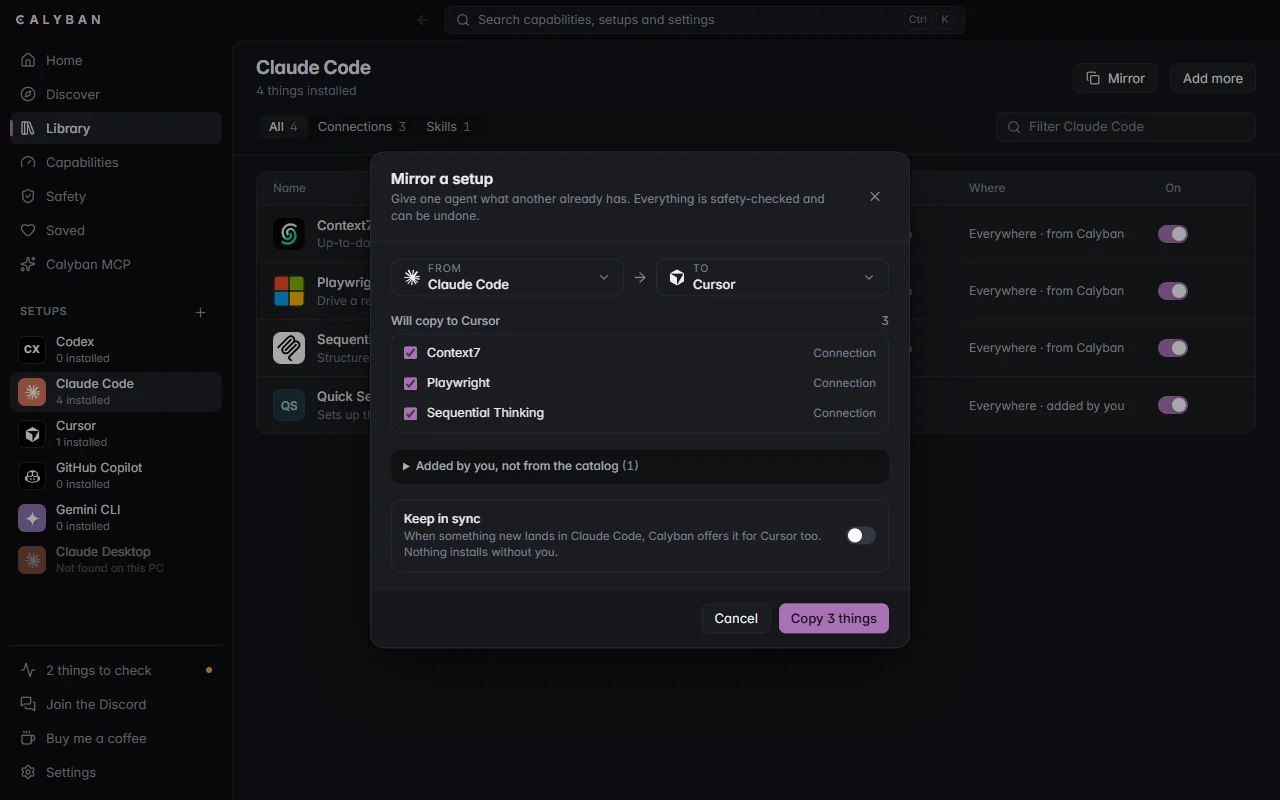
Open Library (or Home) and press Mirror. Pick the agent to copy from and the one to copy to. Calyban lists:
- what will be copied,
- what the target already has,
- what can’t go across, and why.
Press Copy and each item goes in through the normal install path. That means each one is written in the target’s own format, safety-checked, and can be undone.
What doesn’t get copied?
- Anything that needs your details, like an API key. Calyban never moves secrets between agents; those are listed so you can add the key yourself.
- Things you added by hand. Mirror copies what it can match to the catalog.
- Items switched off in the source.
- Skills the target already reads from a shared folder. Cursor, for example, already loads Claude Code’s skills folder, so copying them would show each one twice.
Can it keep two agents in sync?
Yes, if you want it. Keep in sync makes Calyban offer anything new in the source agent for the target too. It never installs on its own; sync is off unless you turn it on.
How long does it take?
In our test, adding Context7 took about 50 to 60 ms per agent through the same install path, and removing it restored each config file byte for byte, including the settings that were already in it. The full test is in Calyban vs. setting up AI agents by hand.
More on the feature: Mirror. If a server lands in the wrong shape for an agent, tell us in Discord with the agent’s version.