Dev blog · Features · 2026-11-22
Which MCP servers use your tokens? Finding the idle ones
An MCP server can cost you tokens without ever being called. Every connected server sends its tool descriptions to the model with each request, so the model can choose a tool. If you never use the server, you still pay for the descriptions.
This post covers how to see that by hand in Claude Code, then what the Capabilities page in Calyban 1.3 shows across five agents. The numbers below are from our own machine and from a demo profile; your setup will differ.
How much does an idle MCP server cost?
It depends on how many tools it has and how long their descriptions are. A server with two short tools adds a few hundred tokens per request. A browser server with a dozen tools, each with a long schema, can add several thousand.
On the development machine we build Calyban on, 12 installed capabilities hadn’t been used in 30 days. Their descriptions still added about 6,100 tokens to every request. At API prices that came to roughly $1.32 a month for that one machine, which is small. The bigger cost is context: 6,100 tokens of tool descriptions sit in front of every task.
How do I check this by hand in Claude Code?
Run /context in a Claude Code session. It shows what’s using the context window right now, including MCP tools. To see one server’s share:
- Run
/contextand note the MCP tools figure. - Remove the server with
claude mcp remove <name>(or comment it out of~/.claude.json). - Start a fresh session in the same folder and run
/contextagain.
The difference is that server’s cost per request. This works, but it shows one session at a time, one agent at a time, and nothing about whether you actually call the server.
What does Calyban show for each tool?
It reads the session logs your agents already keep on your PC (Claude Code, Codex, GitHub Copilot, Gemini CLI and Claude Desktop) and lists every MCP server, skill, subagent and command with:
- Uses, errors and denials, time per use, and the sessions and projects it was used in.
- Cost split three ways: its description on every request (blue), its results when the agent reads and re-reads them (orange), and what a subagent spends on its own work (green).
- A daily trend and the models that called it.
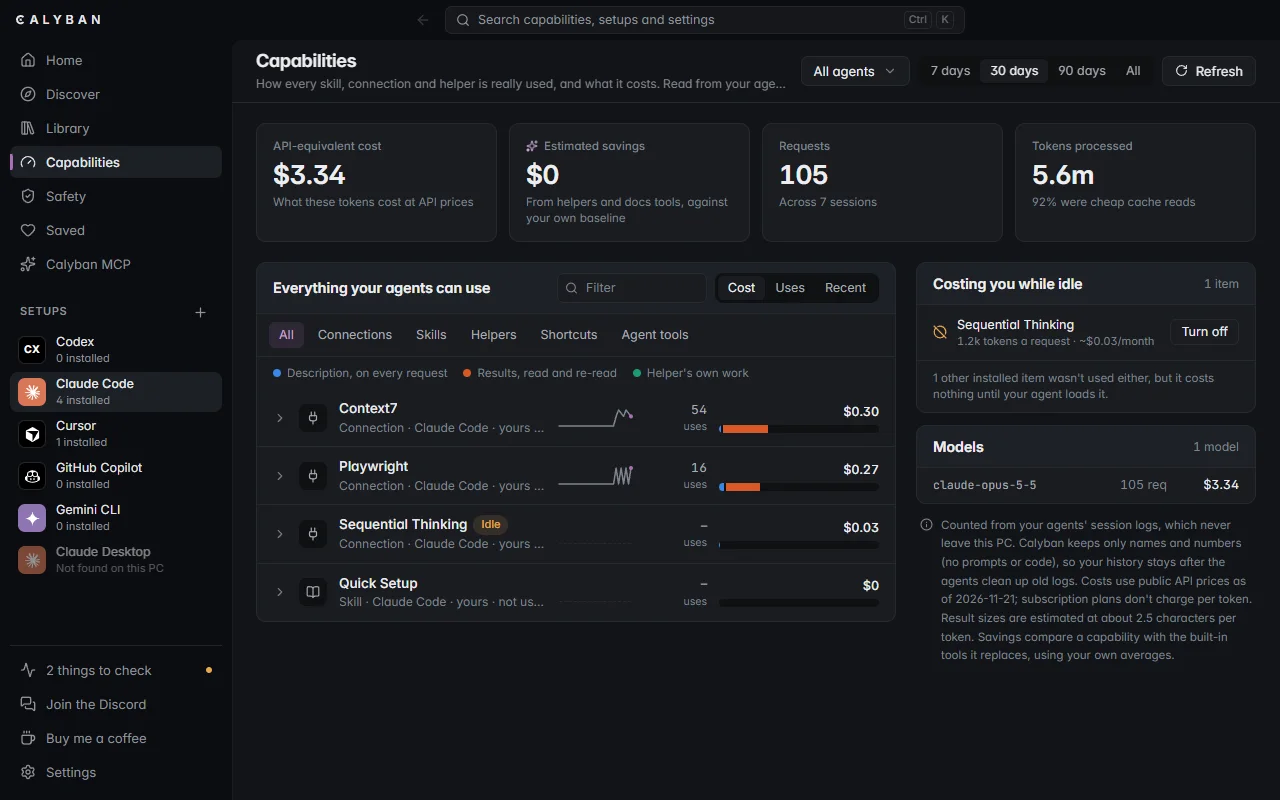
Which ones are idle?
The Costing you while idle panel lists everything that was loaded into an agent during the period but never used, with its tokens per request and an estimated monthly cost. Turn off pauses it in place; you can switch it back on later without reinstalling.
Before switching something off, check whether it belongs to a job you only run once a month. Idle for 30 days isn’t the same as useless.
Does it estimate savings too?
Yes, with a confidence level. A docs server can replace a web search plus a page fetch; a subagent can read 5,000 lines so your main conversation doesn’t. Calyban compares each against your own averages and says how it got the number. In our demo data the savings figure is $0, because nothing in it replaces anything.
Good to know
- It reads Claude Code, Codex, GitHub Copilot, Gemini CLI and Claude Desktop.
- Costs are shown at public API prices, so every server is compared on the same scale, whatever plan you’re on.
- Calyban keeps names and numbers only, never prompts or code. The history lives in a small compressed file on your PC, and Settings has Export CSV and Delete.
The full feature is described on the Capabilities page. If a row disagrees with what /context tells you, post the agent and date range in Discord and we’ll look.