Dev blog · Best of · 2026-11-20
The best AI security tools for developers in 2027
An AI agent writes code faster than you can review it. That’s the whole problem in one sentence. The fix isn’t to slow the agent down. It’s to give it the same scanners and checklists a security engineer would use, so it catches its own mistakes before you do.
These are the tools we’d install going into 2027. All of them are in Calyban’s catalog, and most are from the companies that make the underlying scanner.
How we picked: official tools from security vendors and AI labs first, then well-known security firms, then community tools we’d actually run. One rule we didn’t bend: no offensive “hacking” kits on this list. This post is about securing your own code.
Start with what your agent already has
Before you add scanners, check the add-ons you’ve already installed. Every MCP server, skill and plugin runs with your permissions, and it’s easy to forget what’s in there.
Calyban, the free app we build, does this on its Safety page. It checks everything your agents have, including things you installed by hand without Calyban: skills, plugins, subagents, commands and MCP launch commands. It looks for hidden instructions, prompt injection, download-and-run scripts, credential theft and disabled guardrails, and explains each finding in plain words. Calyban checks skill files before copying them. Check plugin contents on the Safety page after the agent downloads them.
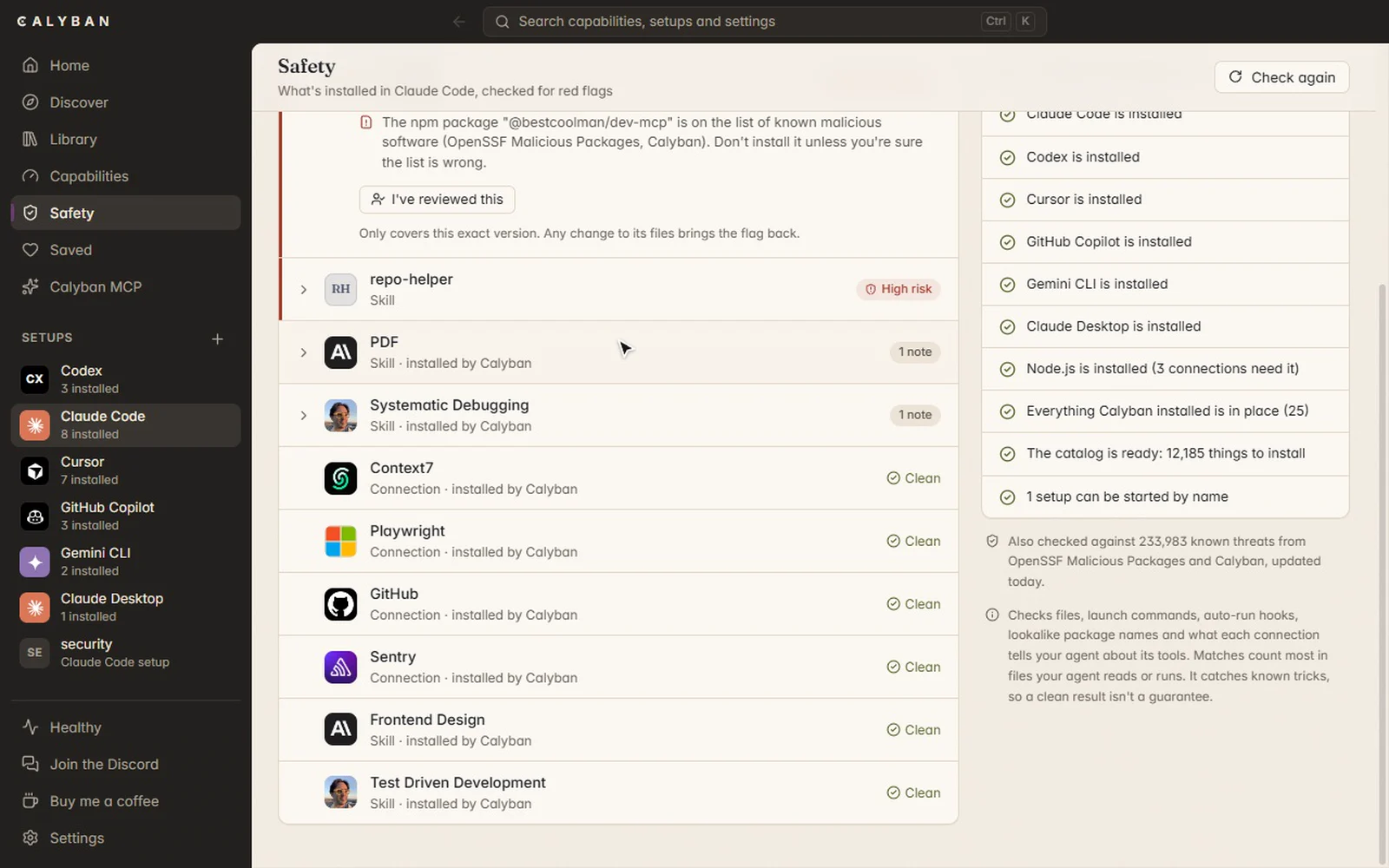
Two Calyban starter kits then install most of this list in one click:
- Blue Team: Security Guidance, Snyk, Sentry, a security scanning plugin, incident-responder subagents and runbook templates.
- Security Audit: Trail of Bits’ Semgrep, CodeQL, differential review, sharp-edges and audit-context skills.
Scan the code your agent writes
Claude Security (Anthropic, Claude Code plugin). Deep vulnerability scanning of your own code, run inside your Claude Code session at an effort level you choose. The part we like: every finding is challenged before it’s reported, so you get fewer “possible SQL injection” notes on code that never touches SQL.
Security Guidance (Anthropic, Claude Code plugin). Runs while the agent works rather than after. It warns on risky patterns as files are edited, reviews the diff when the agent stops, and checks commits for injection, XSS, SSRF, hardcoded secrets and more than 25 other issues. Install this one first if you only install one.
Semgrep (Semgrep, official Claude Code plugin). Semgrep’s rules running as the agent writes, so it learns secure patterns from the start instead of being told off later.
Bring the scanners you already use
If your team already pays for a scanner, connect the agent to it. Then the agent sees the same findings your CI does.
Snyk (Snyk, official). Scans code, dependencies, containers and infrastructure-as-code. Most useful for a question agents are bad at answering from memory: “is this package version safe?”
SonarQube (SonarSource, official). Code quality and security findings from SonarQube Server or Cloud, right in the agent. Handy for “fix the issues Sonar flagged on this branch”, which used to mean a lot of copy and paste.
GitHub (GitHub, official). Not a scanner, but it gives the agent your repos, issues, pull requests and Actions workflows. Combined with the tools above, the agent can find a problem, fix it and open the PR.
Skills from security people
Trail of Bits skills (trailofbits/skills). Trail of Bits is one of the best-known security firms in the field, and it publishes its agent skills openly. Highlights:
- Semgrep runs a full Semgrep scan: it detects your languages, picks rulesets, shows you the plan for approval, then runs it.
- Semgrep Rule Creator writes custom Semgrep rules for bug patterns specific to your codebase.
- Agentic Actions Auditor audits GitHub Actions workflows that run AI agents (Claude Code Action, Gemini CLI, Codex) for security holes. An agent in CI can reach whatever the workflow can, so this one is worth running.
- AddressSanitizer and AFL++ skills for C and C++: memory bugs and fuzzing, set up properly.
Ponytail Audit (DietrichGebert). A one-shot audit of a whole repo: bugs, security holes, what breaks under load, risky code without tests. Findings are ranked and explained in plain English, which makes it a good first pass on code you inherited.
If you build AI agents yourself
Agent Security Hardening (affaan-m). Hardening guidance for agent code that reads untrusted content, calls tools, writes files or handles credentials. If your product has an agent in it, prompt injection is your problem now, and this skill is a structured checklist for it.
For AWS teams
AWS Agents for DevSecOps (Amazon Web Services, Claude Code plugin). Connects Claude Code to AWS’s DevOps and Security agents: incident investigation, code review, vulnerability scans and penetration tests against your own AWS workloads.
Check the tools themselves
Here’s the uncomfortable part. Every tool on this list runs with your permissions. A skill is instructions your agent follows, and an MCP server is a program on your computer. A security tool you didn’t check is still an unchecked tool.
Before installing anything, from this list or elsewhere:
- Prefer official publishers. Most picks above are from the company that makes the scanner.
- Pin a version so the code can’t change after you’ve looked at it.
- Read a skill’s
SKILL.mdand any scripts before you copy it in.
The full five-minute check is in Are Claude Code skills and plugins safe?
Calyban does all three for anything it installs, in Claude Code, Codex and four other agents: it downloads skills at an exact commit, scans them before anything is written, and backs up your config so Undo is real.
For more, see the best AI coding agents for 2027 and separate agent setups for red team and blue team work.
Know a security tool that belongs here? Tell us on Discord. Calyban is free. If it saves you an afternoon, a coffee keeps it going.