Dev blog · Release notes · 2026-11-22
Calyban 1.3 is here, and it's huge
1.3 is out, and it’s the biggest release since 1.0. If you already have Calyban, it downloads the update in the background and asks you to restart. If you don’t, it’s free.
The short version: Calyban now shows you what every tool in your agent actually costs, copies a setup from one agent to another, checks launches against a quarter of a million known malicious packages, and has an MCP server of its own. The catalog also grew by about half. Each change below links to a post that covers it properly.
1.3 on one screen
- Added Capabilities: uses, errors and token cost for every MCP server, skill and subagent, across five agents.
- Added Mirror: copy what one agent has into another, in that agent’s own format.
- Added One folder with a project picker that already knows your projects.
- Added Calyban MCP, in the app and as a free public server.
- The safety check now weighs findings by file role, checks plugin hooks and tool descriptions, and knows about 234,000 malicious packages.
- The catalog went from about 7,900 items to more than 12,000.
- Added a short first-run tour, and refreshed Discover.
What does each tool actually cost?
The new Capabilities page reads the session logs that Claude Code, Codex, GitHub Copilot, Gemini CLI and Claude Desktop already keep on your PC. For every MCP server, skill, subagent and command it shows how often it’s used, how often it fails, and what it costs in tokens. The cost is split into its description (sent with every request), its results, and a subagent’s own work.
The part people notice first is Costing you while idle: tools that were loaded and never used, still adding tokens to every request. On our own machine that was 12 tools and about 6,100 tokens a request.
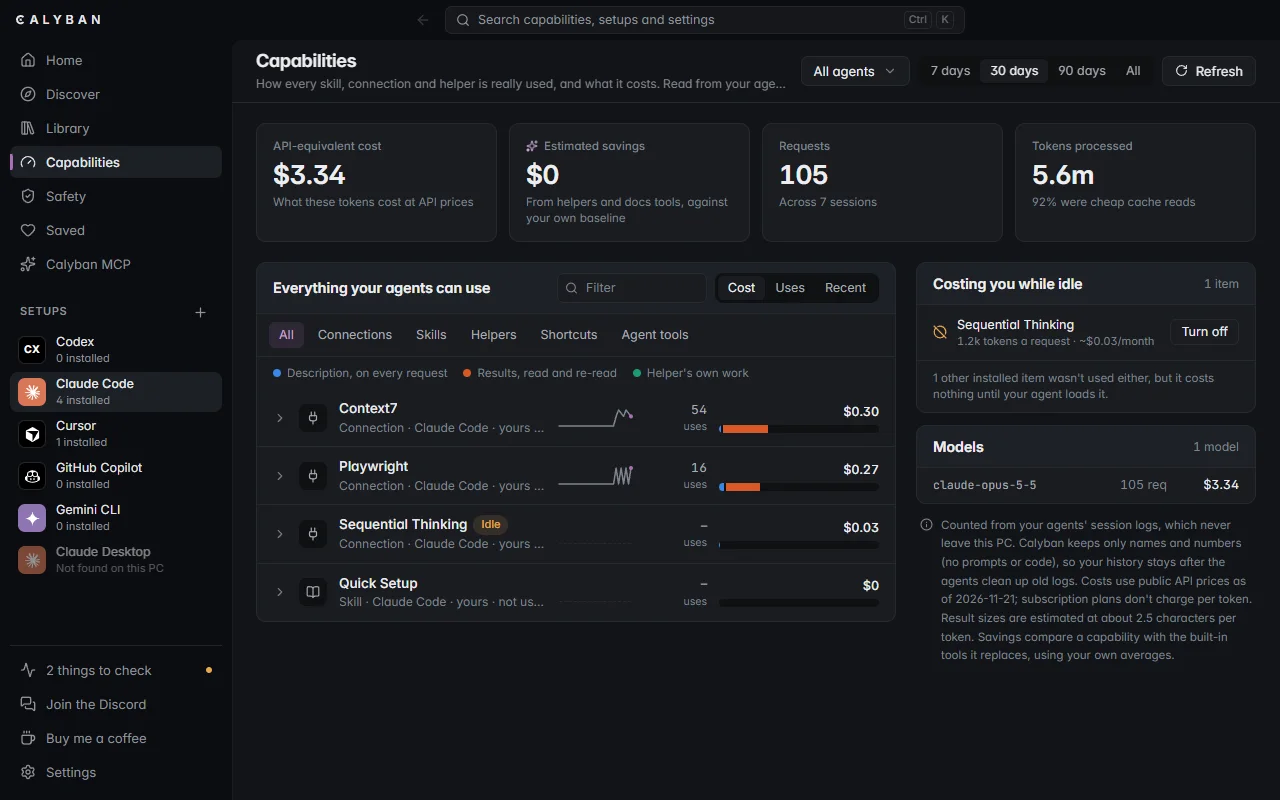
Nothing leaves your PC, and Codex users get their 5-hour and weekly plan limits on the same page. More: Which MCP servers use your tokens? and See your Codex usage limits.
Copy a setup to another agent
Every agent keeps MCP servers in a different file and format. Mirror copies what one agent has into another: it lists what will go across, what’s already there and what can’t go (anything needing your API key, for instance), then installs each item through the normal path, safety check and Undo included. Keep in sync offers new items for the second agent too, if you want that. Copy MCP servers from Claude Code to Cursor, Codex and Gemini CLI.
Install into one project, from a list
One folder no longer means hunting through Explorer. Calyban lists the project folders your agents already work in, from their own records, and writes the right project file for each agent: .mcp.json, .codex/config.toml, .cursor/mcp.json and so on. How to install an MCP server or skill in just one project.
A safety check that knows more
- Context: a download-and-run line in a skill’s instructions is high risk; the same line quoted in a test file isn’t. That’s what stopped the Ponytail skill being flagged.
- Plugin hooks are checked one by one, because they run without asking. What plugin hooks can do, and how to check them.
- Tool poisoning and rug pulls: MCP tool descriptions are checked for injected instructions, and a server that changes its tools later gets noticed. Tool poisoning and rug pulls in MCP servers.
- Lookalike packages one typo from a popular one are high risk. Typosquatted MCP packages.
- Known malicious packages: about 222,000 npm and 12,000 PyPI names from OpenSSF, plus the exact bad releases of about 2,400 hijacked packages. How Calyban checks MCP launch packages against known malware.
We tested it on the 60 most-starred skills (no false alarms) and on eight written attacks (all eight caught). The tests.
Calyban has its own MCP server
Add it to your agent and ask for “a skill for testing my React app” mid-task. The one in the app also knows what’s installed, runs the safety check and reads usage; when your agent wants something, Calyban opens it for you to approve. There’s also a free public server at calyban.com/calyban-mcp with no install. Calyban MCP: let your AI agent find its own tools.
The catalog grew by half
From about 7,900 items to more than 12,000. Two reasons. We found and fixed a bug that had been silently dropping MCP servers: the importer stopped reading the official MCP Registry after 500 pages, and the registry is now past 700. And we added 159 popular skill repos (every one we found with 5,000+ stars that’s made for sharing), with each big repo also available as a single “full collection” kit. Install a whole skill repo in one click.
Smaller things
- Added a three-step first-run tour. Skip it with Esc; replay it from Settings → Quick tour.
- Refreshed Discover, with filter chips and a filter panel.
- Your capability history is stored in a small compressed file, with Export CSV and Delete in Settings.
- The rare surprises in the app have new art.
Fixed
- Fixed a flicker right after switching to the Calyban theme.
- Fixed the wordmark sitting slightly off its baseline.
- Fixed the desktop icon looking small next to other apps.
- Fixed starter kits claiming agents none of their contents work with.
- Fixed “One folder” being offered where an agent can’t use it.
What’s next
Mac is still in testing: join the list to hear when it’s ready. (Update: Linux arrived in 1.3.1.) More catalog sources are queued behind them.
Bugs and ideas go on Discord. Calyban is free. If it saves you an afternoon, a coffee keeps it going.